How to integrate a payment gateway into a high-risk website.
This guide explains how high-risk merchants can connect a payment gateway to WooCommerce, Shopify, Wix, BigCommerce, and custom websites.
30+
Years of Experience
1000+
Happy Clients
50+
Payment Options
99%
Approval Rate
Understanding Payment Gateways
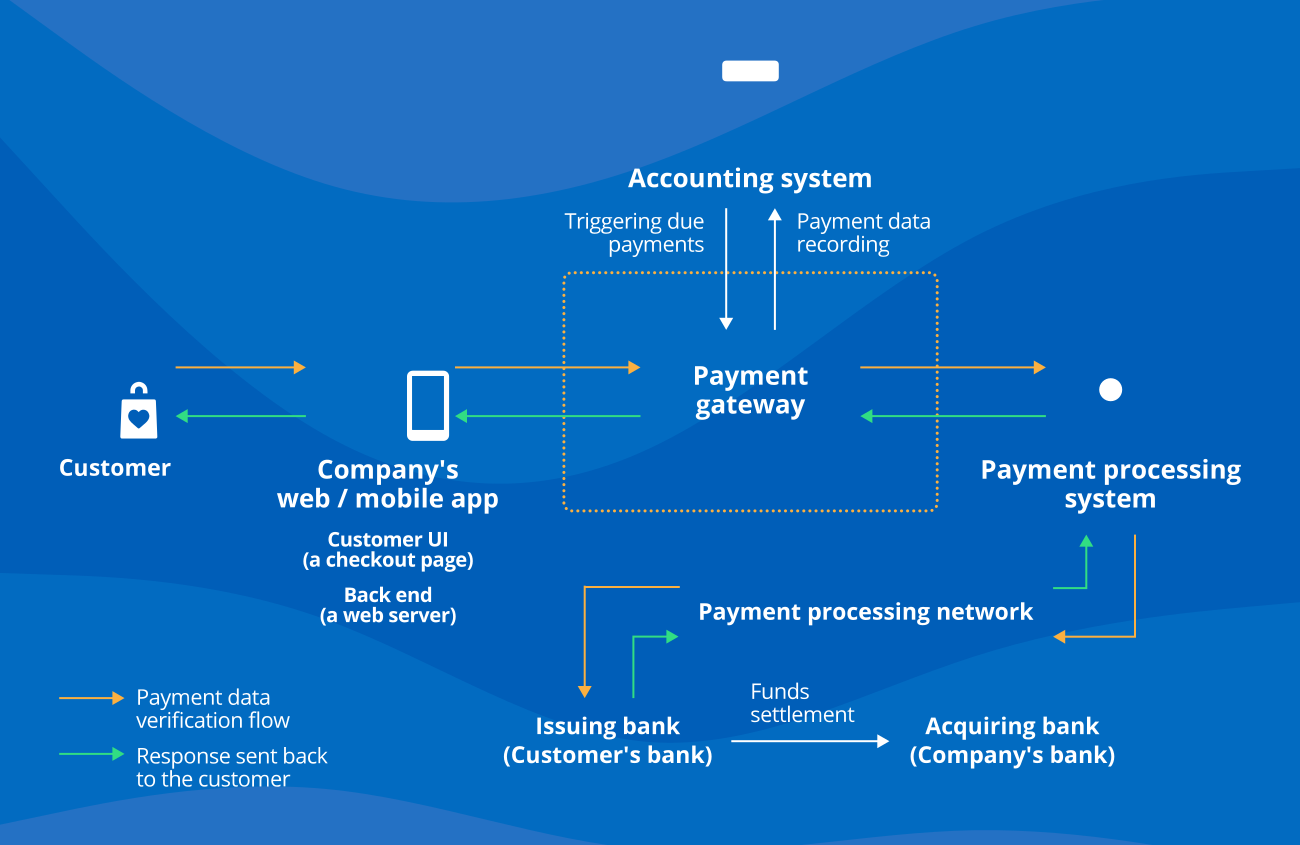
A payment gateway is a crucial component for online businesses, especially high-risk merchants. It acts as a mediator between your customers and your payment processor. Merchants must ensure their payment gateway is reliable, secure, and capable of handling their specific needs.
Why Choose High-Risk Payment Gateways?
High-risk businesses often face challenges in obtaining merchant accounts due to their nature. Payment gateways that specialize in high-risk markets can ensure higher approval rates and tailored solutions to meet the unique needs of your business.
Integrating Payment Gateways with WooCommerce
To integrate a payment gateway into your WooCommerce store, follow these steps:
- Install the payment gateway plugin.
- Settings Configuration: Navigate to WooCommerce > Settings > Payments.
- Enter your API keys from your payment gateway account.
- Set fraud settings and test your integration.
You must complete test transactions to ensure everything is functioning correctly before launching.
Setting Up Payment Gateways in Shopify
Shopify provides numerous high-risk payment solutions. Here’s how to set up:
- Go to your Shopify Admin and click on Settings > Payment providers.
- Select the payment gateway you wish to use from the alternatives.
- Input your API credentials and configure settings as required.
Shopify makes it easy to manage refunds and customer disputes through their dashboard.
Integrating with Wix
Wix offers a straightforward process for payment integration:
- Access the Wix dashboard and navigate to Settings > Accept Payments.
- Choose from Wix’s supported payment gateways or add custom options.
- Input necessary details, such as API keys, to finalize the setup.
BigCommerce Payment Gateway Integration
For BigCommerce users, the process is similar:
- Log into your BigCommerce account and go to Store Setup > Payments.
- Select a payment gateway, and follow the prompts to configure it.
Connecting Custom Websites
If you run a custom website, integrate using the API provided by your payment gateway service:
- Retrieve your account’s API keys.
- Use those keys to authenticate requests from your site.
- Implement hosted or direct checkout solutions as needed.
Always perform test transactions to ensure that everything is functioning correctly before going live.
Managing Fraud Settings
Utilize specific fraud settings provided by your payment gateway to minimize risks associated with high-risk transactions. This can include address verification and transaction monitoring.
Handling Refunds and Chargebacks
Refund policies vary by payment gateway, and it’s essential to understand how to handle chargebacks appropriately to maintain your merchant account’s standing.
Why Trust High Wire Payments?
We provide the best solutions for high-risk payments.
Tailored Solutions
We understand the unique needs of high-risk businesses.
Expert Support
Our support team is experienced in high-risk payment processing.
Reliable Transactions
We ensure secure and reliable payment transactions for your business.
What types of payment gateways are available?
There are various options including Authorize.Net, NMI, and others.
What is direct checkout?
Direct checkout allows customers to complete transactions directly on your site, enhancing user experience.
How do I manage fraud settings?
Most gateways have a section in their settings for managing fraud detection, which is crucial for high-risk merchants.
Can I process refunds through the gateway?
Yes, refund processing is typically supported through the payment gateway interfaces.
What are API keys?
API keys are unique identifiers used to authenticate your application with your payment processor.
What are test transactions?
These are transactions made with dummy data to ensure all settings and integrations are properly configured.
Ready to integrate?
Let us help you navigate the complexities of payment processing. Contact us today!
Apply Now →